Desktop Scheduler
Published on November 12th, 2021 at 12:37 am
What is it?
The Desktop Scheduler was a project that I completed for my second Java class at my undergraduate university. The class provided advanced training on Java concepts including lambda expressions, collections, input/output, error handling, and a deeper dive into JavaFX. On top of meeting the project prompt requirements and designing a rich user experience, I was also assigned the task of creating logging functionality (where actions are automatically written to a text file), custom exceptions, and localization.
Unlike my first Java project at my undergraduate university, I was given the privilege to completely design all aspects of this application. The rules were that the application contained the following:
- Log-in form that determines user location and translates the labels
- The ability to add, update, and delete customer records with information for name, address, and phone number
- The ability to add, update, and delete appointment records with information for the appointment type and existing customer
- The ability to view a calendar both by month and by week
- The ability to adjust the appoinment times based on daylight savings time
- Two custom exceptions
- Two lamda expressions
- Three different types of reports
- An alert if an appointment is within 15 minutes of the users login
- Log user activity in a text file
What does it do?
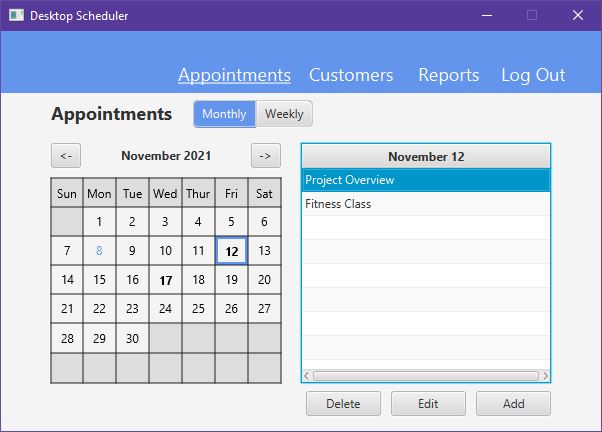
The point of the desktop scheduler is to act as a basic human resources management console. Users are essentially consultants that can create records of customer information and schedule appointments with said customers. Once the user is logged in, they are presented with the Appointments screen pre-configured to show the monthly calendar.
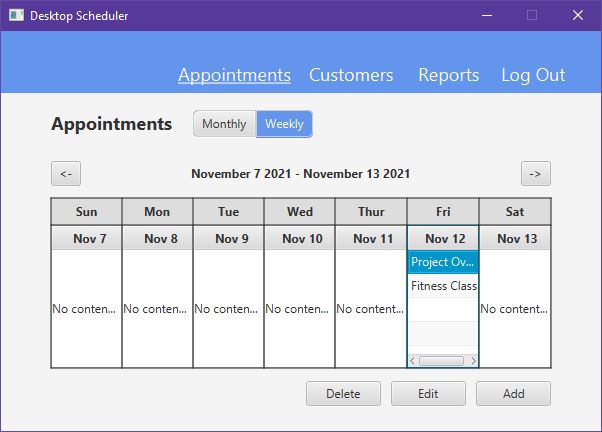
As an alternative, the user can select the Weekly option to switch the screen to a weekly calendar.
On the monthly view, the user can select any day on the calendar to view appointments scheduled for that day. If a day has existing appointments, the number will change to bold and if selected, a table of appointments will be shown on the right. The user can then select an appointment in the table and edit or delete it if necessary.
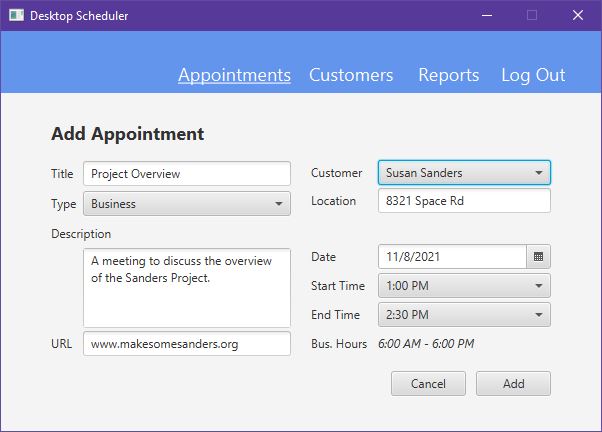
To add an appointment, the user can go to the add appointment screen by clicking the Add button at the bottom. From this screen, the user can give the appointment a title, description, URL, address, and start/end times. The user will also need to select the type of appointment and the customer that the appointment is with. The customer selection box will pull from the existing customers in the application.
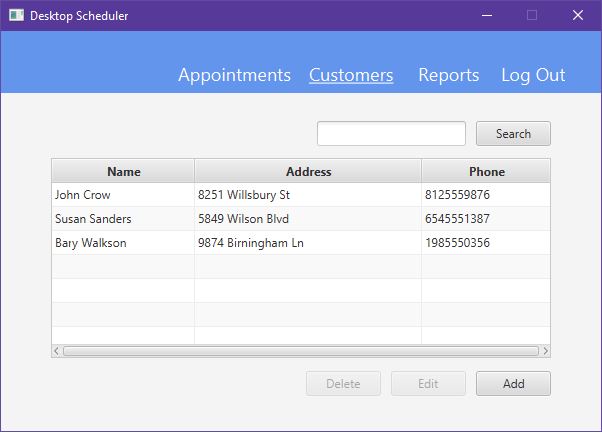
To create a new customer, the user can click the Customers tab at the top and they will be presented a table of all existing customers in the application. By selecting an existing customer, the user can edit or delete the record, or the user can add a new user with the Add button at the bottom.
Lastly, the user can generate reports using the Reports tab at the top. On this screen, there are three types of reports that can be generated:
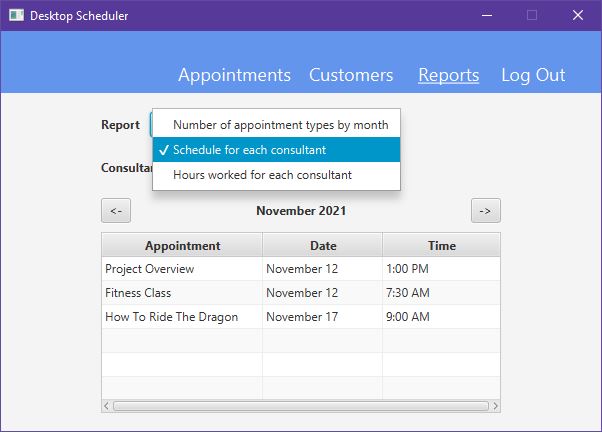
Number of appointment types by month
This screen has a table with Type and Occurrences columns. The data changes depending on the month that is selected. For each type, the occurrences column changes to show the appointment of appointments of that type for that month. This screen also shows the Total types of appointments for that month and the Total Appointments for the month in general.
Schedule for each consultant
This screen has a table with Appointment, Date, and Time columns. The data changes depending on the month that is selected. This table is pretty simple actually. It shows all of the appointments for that month for the selected user.
Hours worked for each consultant
This screen has a table with Consultant and Hours Worked columns. The data changes depending on the month that is selected. Each consultant is a user of the application. For every user, the report adds up the time between every appointment they have scheduled for that month and displays it in the Hours Worked column.
How does it work?
This application was made with Java and JavaFX. The project is made up of 3 models, 11 views (screens), 11 controllers, 3 custom exceptions, and 5 utility classes. There is also a resource bundle for the login screen to manage localization. This project supports both English and German on the login screen.
A key component of the application is the concept of Local Data. Although all of the data initially exists outside of the application (in a database), the application will import all of the data into class objects that are accessible from memory. This does two things: It makes accessing data within the application easier because it doesn’t have to query the database to access data. It also makes it faster because querying the database takes more time than it would take to access an object in memory. This concept is not scalable and therefore would be a bad idea for actual businesses that pull data from massive warehouses since the application would have to query ALL of the data before the application starts.
Models
The models are the object classes for each type of data. You can think of these classes as the instructions to create objects in the program. Objects are, in this case, users, customers, and appointments. Since there are three types of data, there are three object classes in the project: User.java, Customer.java, and Appointment.java. As an example, User.java is shown below.
User.java
//*******************************************************************
// Customer
//
// Creates a user object when instantiated. This is used for LocalData.
//*******************************************************************

package models;

import javafx.beans.property.SimpleBooleanProperty;
import javafx.beans.property.SimpleIntegerProperty;
import javafx.beans.property.SimpleStringProperty;

public class User {

    private final SimpleIntegerProperty
            id = new SimpleIntegerProperty();

    private final SimpleStringProperty
            userName = new SimpleStringProperty(),
            password = new SimpleStringProperty();

    private final SimpleBooleanProperty
            active = new SimpleBooleanProperty();

    public User() {}

    public User(int id, String userName, String password, boolean active) {
        setId(id);
        setUserName(userName);
        setPassword(password);
        setActive(active);
    }

    public int getId() {
        return id.get();
    }

    public SimpleIntegerProperty idProperty() {
        return id;
    }

    public void setId(int id) {
        this.id.set(id);
    }

    public String getUserName() {
        return userName.get();
    }

    public SimpleStringProperty userNameProperty() {
        return userName;
    }

    public void setUserName(String name) {
        this.userName.set(name);
    }

    public String getPassword() {
        return password.get();
    }

    public SimpleStringProperty passwordProperty() {
        return password;
    }

    public void setPassword(String password) {
        this.password.set(password);
    }

    public boolean isActive() {
        return active.get();
    }

    public SimpleBooleanProperty activeProperty() {
        return active;
    }

    public void setActive(boolean active) {
        this.active.set(active);
    }
}
Views
Views are written in a markup language called FXML. I didn’t actually write any of the files, but I did manually edit them to add connections to the controllers. I used a program called Scene Builder to assemble the interfaces. Scene Builder is kind of like a drag-and-drop website editor, but it has a few more controls for labeling the controls so that I can hook them into the controllers.
LogIn.fxml
<?xml version="1.0" encoding="UTF-8"?>

<?import java.lang.String?>
<?import javafx.scene.control.Button?>
<?import javafx.scene.control.ButtonBar?>
<?import javafx.scene.control.Label?>
<?import javafx.scene.control.PasswordField?>
<?import javafx.scene.control.TextField?>
<?import javafx.scene.layout.AnchorPane?>
<?import javafx.scene.layout.ColumnConstraints?>
<?import javafx.scene.layout.GridPane?>
<?import javafx.scene.layout.HBox?>
<?import javafx.scene.layout.RowConstraints?>
<?import javafx.scene.layout.StackPane?>
<?import javafx.scene.layout.VBox?>
<?import javafx.scene.text.Font?>

<AnchorPane maxHeight="-Infinity" maxWidth="-Infinity" minHeight="-Infinity" minWidth="-Infinity" prefHeight="400.0" prefWidth="600.0" stylesheets="@style.css" xmlns="http://javafx.com/javafx/8.0.171" xmlns:fx="http://javafx.com/fxml/1" fx:controller="controllers.LogInController">
   <children>
      <VBox prefHeight="400.0" prefWidth="600.0">
         <children>
            <ButtonBar id="navigation-menu" prefHeight="60.0">
              <buttons>
                  <Button fx:id="navbarLogInButton" mnemonicParsing="false" text="Log In">
                     <styleClass>
                        <String fx:value="navigation-item" />
                        <String fx:value="navigation-item-selected" />
                     </styleClass>
                  </Button>
              </buttons>
            </ButtonBar>
            <StackPane id="small-content-container" prefHeight="340.0">
               <children>
                  <VBox alignment="CENTER" prefHeight="200.0" prefWidth="100.0" StackPane.alignment="CENTER">
                     <children>
                        <HBox alignment="CENTER_LEFT" prefHeight="50.0" prefWidth="200.0">
                           <children>
                              <Label fx:id="titleLabel" text="Log In">
                                 <font>
                                    <Font name="System Bold" size="18.0" />
                                 </font>
                              </Label>
                           </children>
                        </HBox>
                        <GridPane id="login-form">
                          <columnConstraints>
                            <ColumnConstraints hgrow="SOMETIMES" maxWidth="75.0" minWidth="10.0" prefWidth="100.0" />
                            <ColumnConstraints hgrow="SOMETIMES" minWidth="10.0" prefWidth="100.0" />
                          </columnConstraints>
                          <rowConstraints>
                            <RowConstraints minHeight="10.0" prefHeight="30.0" vgrow="SOMETIMES" />
                            <RowConstraints minHeight="10.0" prefHeight="15.0" vgrow="SOMETIMES" />
                            <RowConstraints minHeight="10.0" prefHeight="30.0" vgrow="SOMETIMES" />
                              <RowConstraints maxHeight="15.0" minHeight="10.0" prefHeight="30.0" vgrow="SOMETIMES" />
                          </rowConstraints>
                           <children>
                              <Label fx:id="usernameLabel" text="Username" />
                              <Label fx:id="passwordLabel" text="Password" GridPane.rowIndex="2" />
                              <TextField fx:id="usernameTextField" GridPane.columnIndex="1" />
                              <Label fx:id="usernameErrorLabel" text="The username does not exist" textFill="RED" GridPane.columnIndex="1" GridPane.rowIndex="1" />
                              <Label fx:id="passwordErrorLabel" text="The password is incorrect" textFill="RED" GridPane.columnIndex="1" GridPane.rowIndex="3" />
                              <PasswordField fx:id="passwordPassField" onKeyPressed="#passwordPassFieldKeyPress" GridPane.columnIndex="1" GridPane.rowIndex="2" />
                           </children>
                        </GridPane>
                        <HBox alignment="CENTER_RIGHT" prefHeight="50.0" prefWidth="200.0">
                           <children>
                              <Button fx:id="submitButton" alignment="CENTER" mnemonicParsing="false" onAction="#submitButton" prefWidth="75.0" text="Submit" />
                           </children>
                        </HBox>
                     </children>
                  </VBox>
               </children>
            </StackPane>
         </children>
      </VBox>
   </children>
</AnchorPane>
Controllers
Controllers are the core of all the logic in the application. They take the data provided by the models and the controls provided by the views to create usable functionality. Controllers hook into views through specific identifiers. Notice the @FXML tag before each of the variables at the top of LoginController.java. Each one is a JavaFX hook that corresponds to a matching fx:id in Login.fxml.
LoginController.java
//*******************************************************************
// LogInController
//
// This controls the interactions for LogIn.fxml. This is the first screen of the application and will register the
// user as "logged-in" if the entered password is correct and they are marked as active.
//*******************************************************************

package controllers;

import javafx.event.ActionEvent;
import javafx.fxml.FXML;
import javafx.fxml.Initializable;
import javafx.scene.control.*;
import javafx.scene.input.KeyEvent;
import main.DesktopScheduler;
import models.Appointment;
import models.User;
import util.Helper;
import exceptions.LogInException;
import util.Logger;

import java.io.IOException;
import java.net.URL;
import java.time.LocalDateTime;
import java.time.format.DateTimeFormatter;
import java.time.temporal.ChronoUnit;
import java.util.Locale;
import java.util.ResourceBundle;

public class LogInController implements Initializable {

    // Components
    @FXML private Button navbarLogInButton;
    @FXML private Label titleLabel;
    @FXML private Label usernameLabel;
    @FXML private Label passwordLabel;
    @FXML private Button submitButton;
    @FXML private TextField usernameTextField;
    @FXML private Label usernameErrorLabel;
    @FXML private PasswordField passwordPassField;
    @FXML private Label passwordErrorLabel;

    // Resource Bundle for Language Support
    private static final ResourceBundle rb = ResourceBundle.getBundle("lang/LogIn", Locale.forLanguageTag(Locale.getDefault().getCountry()));

    // Date Formats
    private final DateTimeFormatter singleMinuteFormatter = DateTimeFormatter.ofPattern("m");
    private final DateTimeFormatter isoDateFormatter = DateTimeFormatter.ofPattern("yyyy-MM-d");
    private final DateTimeFormatter timeFormatter = DateTimeFormatter.ofPattern("h:mm a");

    // Current User
    private User currentUser = null;

    // Password Field Key Press
    @FXML private void passwordPassFieldKeyPress(KeyEvent event) {
        if (event.getCode().toString().equals("ENTER")) {
            submitButton.fire();
        }
    }

    // Upcoming Appointment Alert
    private void throwAppointmentAlert(Appointment appointment) {
        String appointmentAlertMessage = rb.getString("upcomingAppointment") + "\n";
        appointmentAlertMessage += "Name: " + appointment.getTitle() + "\n";
        appointmentAlertMessage += rb.getString("from") + ": " + appointment.getStart().format(timeFormatter) + "\n";
        appointmentAlertMessage += rb.getString("to") + ": " + appointment.getEnd().format(timeFormatter);
        Alert appointmentAlert = new Alert(Alert.AlertType.INFORMATION, appointmentAlertMessage, ButtonType.OK);
        appointmentAlert.showAndWait();
    }

    // Check for an appointment in the next 15 minutes
    private void checkForUpcomingAppointment() {

        int currentMinute = Integer.parseInt(LocalDateTime.now().format(singleMinuteFormatter));
        LocalDateTime currentTime = LocalDateTime.now();

        if ((currentMinute >= 15 && currentMinute <= 30) || (currentMinute >= 45)) {
            for (Appointment appointment:DesktopScheduler.getLocalData().getAppointmentsByDate(LocalDateTime.now().format(isoDateFormatter))) {
                if (appointment.getStart().isAfter(currentTime)) {

                    LocalDateTime tempDateTime = LocalDateTime.from(currentTime);
                    long hours = tempDateTime.until(appointment.getStart(), ChronoUnit.HOURS);
                    tempDateTime = tempDateTime.plusHours(hours);
                    long minutes = tempDateTime.until(appointment.getStart(), ChronoUnit.MINUTES);

                    if (hours == 0 && minutes <= 15) throwAppointmentAlert(appointment);
                }
            }
        }
    }

    // Alert if user is not active
    private static final Alert activeAlert = new Alert(Alert.AlertType.ERROR,
            rb.getString("activeError"), ButtonType.CLOSE);

    // Determine if the username matches a record, if the user is active, and if the password matches
    private boolean authorizeLogin(String username, String password) {

        User userLogin = DesktopScheduler.getLocalData().getUserByName(username);

        // Reset the fields
        usernameErrorLabel.setText("");
        usernameTextField.setStyle("-fx-border-color: inherit");
        passwordErrorLabel.setText("");
        passwordPassField.setStyle("-fx-border-color: inherit");

        // If username does not exist
        if (userLogin == null) {
            usernameErrorLabel.setText(rb.getString("usernameError"));
            usernameTextField.setStyle("-fx-border-color: red");
            Logger.log(Logger.Type.ERROR, "A Non-existent username \"" + usernameTextField.getText() + "\" was submitted.");
            throw new LogInException("Username does not exist.");

        // If user is not active
        } else if (!userLogin.isActive()) {
            activeAlert.showAndWait();
            Logger.log(Logger.Type.ERROR, "A log in of the inactive user \"" + usernameTextField.getText() + "\" was attempted.");
            return false;

        // If the password is incorrect
        } else if (!password.equals(userLogin.getPassword())) {
            passwordErrorLabel.setText(rb.getString("passwordError"));
            passwordPassField.setStyle("-fx-border-color: red");
            Logger.log(Logger.Type.ERROR, "An incorrect password was submitted.");
            throw new LogInException("Password is incorrect.");
        }

        currentUser = userLogin;
        return true;
    }

    // Submit Button
    @FXML private void submitButton(ActionEvent event) {

        if (authorizeLogin(usernameTextField.getText(), passwordPassField.getText())) {

            // Store the current user object in DesktopScheduler.java
            DesktopScheduler.setCurrentUser(currentUser);
            System.out.println(rb.getString("loggedInAs") + " "
                    + Helper.changeColor(DesktopScheduler.getCurrentUser().getUserName(), Helper.Color.BLUE) + "\n");
            Logger.log(Logger.Type.INFO, "A user has logged in as " + currentUser.getUserName() + ".");

            // Check for an upcoming appointment
            checkForUpcomingAppointment();

            try {
                DesktopScheduler.changeScenes("AppointmentsMonthly");
            } catch (IOException e) {
                System.out.println(e.getMessage());
            }
        }
    }

    @Override
    public void initialize(URL location, ResourceBundle resources) {

        // Configure Labels
        navbarLogInButton.setText(rb.getString("login"));
        titleLabel.setText(rb.getString("login"));
        usernameLabel.setText(rb.getString("username"));
        usernameErrorLabel.setText("");
        passwordLabel.setText(rb.getString("password"));
        passwordErrorLabel.setText("");
        submitButton.setText(rb.getString("submit"));
    }
}
The Calendar
Arguably, the most complex part of the application is the Calendar in the AppointmentsMonthlyController.java. I found the process of creating a dynamic calendar to be quite challenging. The calendar consists of 42 boxes (or panes as I call it) and 42 numbers, one inside each box. There needed to be some type of relationship between each box and each number because, as an example, number 37 is always inside pane 37 and so on. JavaFX didn’t offer an inherent solution to do this, so it was on me to figure something out. The numbers could not be static because every month the numbers would change position as they do in all calendars. June 1st may be a Tuesday, but July 1st is a Thursday.
So what did I do? I evaluated a series of Java data structures to find a structure that could create a parent-child relationship as a single item in an ordered array. There might have been several ways to organize the data, but because each variable that I was storing was referencing a JavaFX control object, some ways just didn’t work. Thankfully I found one data structure that worked beautifully: a Linked Hash Map. A normal hash map would have allowed me to create a set of parent-child relationships, but because it is not ordered, I couldn’t loop through it each month to draw a calendar. A Linked Hash Map, however, preserves the order in which the data was added, so the responsibility is then on me to put the data in the right order.
In AppoinmentsMonthlyController.java, I hooked in all of the panes and numbers from the AppointmentMonthly.fxml view and created a new LinkedHashMap for the calendar:
// Components
@FXML private Pane calendarCell_1, calendarCell_2, calendarCell_3 ...
@FXML private Text calendarCellNum_1, calendarCellNum_2, calendarCellNum_3 ...

// LinkedHashMap for creating an iterable relationship between two JavaFX components
private final LinkedHashMap<Pane, Text> calendarHashMap = new LinkedHashMap<>();
In the initialize method that runs before each window renders, I mapped each of the panes and numbers into the calendarHashMap in the correct order and call the genearteCalendar() method.
// Configure Calendar Map
calendarHashMap.put(calendarCell_1, calendarCellNum_1);
calendarHashMap.put(calendarCell_2, calendarCellNum_2);
calendarHashMap.put(calendarCell_3, calendarCellNum_3);
...

//Generate the calendar
generateCalendar();
The generateCalendar() method gets the current date and sets it to a local date object that is changed when the user switches months. The calendar is created through a loop that populates each cell with the correct number based on where the month starts. The remaining cells are painted gray to signify that they are not intractable.
// Generate the Calendar for the Month
private void generateCalendar() {

  // Set calendar initial values
  calendar.set(calendar.get(Calendar.YEAR), calendar.get(Calendar.MONTH), 1);
  int calendarMapIndex = 1;
  boolean endOfMonth = false;

  // Iterate through the cells and populate them with correct day number
  for (Pane pane:calendarHashMapSet) {

    // If the calendar index is greater-than or equal to the first weekday of the month, start the iteration
    if (calendarMapIndex >= calendar.get(Calendar.DAY_OF_WEEK) && !endOfMonth) {
      calendarHashMap.get(pane).setText(Integer.toString(calendar.get(Calendar.DAY_OF_MONTH)));
      pane.getStyleClass().remove("cal-empty-cell");

      // Check if any appointments are on this day
      if (!DesktopScheduler.getLocalData().getAppointmentsByDate(isoSingleDateFormat.format(calendar.getTime())).isEmpty()) {
        if (!calendarHashMap.get(pane).getStyleClass().contains("cal-bold-text")) {
          calendarHashMap.get(pane).getStyleClass().add("cal-bold-text");
        }
      } else {
        calendarHashMap.get(pane).getStyleClass().remove("cal-bold-text");
      }

      // Check if this day is today's date
      if (isoDateFormat.format(calendar.getTime()).equals(LocalDateTime.now().format(isoDateFormatter))) {
        if (!calendarHashMap.get(pane).getStyleClass().contains("cal-blue-text")) {
          calendarHashMap.get(pane).getStyleClass().add("cal-blue-text");
          selectCell(pane, calendarHashMap.get(pane));
        }
      } else {
        calendarHashMap.get(pane).getStyleClass().remove("cal-blue-text");
      }

      if (calendar.get(Calendar.DAY_OF_MONTH) != calendar.getActualMaximum(Calendar.DAY_OF_MONTH)) {
        calendar.add(Calendar.DAY_OF_MONTH, 1);
      } else {
        endOfMonth = true;
      }

      // Otherwise remove the text and color the pane gray
    } else {
      calendarHashMap.get(pane).setText("");
      if (!pane.getStyleClass().contains("cal-empty-cell")) {
        pane.getStyleClass().add("cal-empty-cell");
      }
    }

    calendarMapIndex++;
  }
    }
There is also code in this loop to check if there are any appointments each day and if that day is the current day. If either are true, the number is changed to reflect that.
Cloning the Project
If you are interested in seeing all of the code for the project, you can do so by visiting my code repository on Bitbucket. If you want to clone the project and try it out, you will need a database with the correct structure for the application to connect to. You will also need a JDBC Driver (such as a MySQL Connector if you are using MySQL). The database structure is shown below:
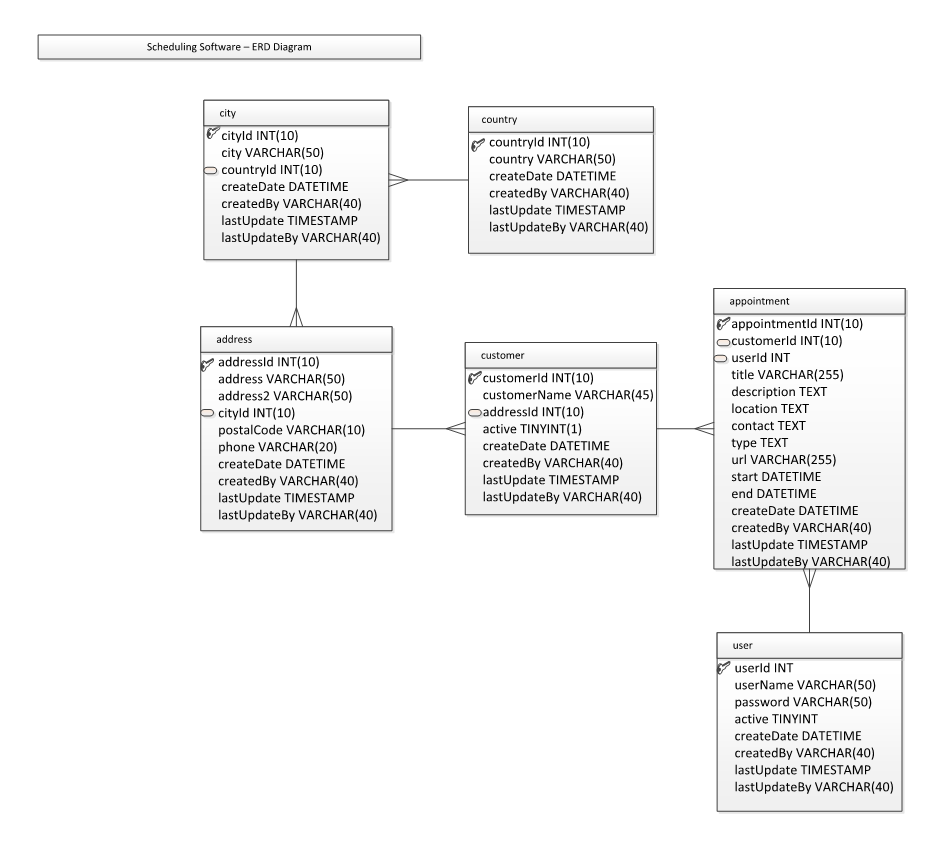
You will also need to change the database information in util/database.java to match your private database information. Example shown below:
public class Database {

    // Database connection parameters
    private static final String DBURL = "jdbc:mysql://wgudb.ucertify.com:3306/Your Database" +
            "?autoReconnect=true&useSSL=false";
    private static final String DBUSERNAME = "Your Username";
    private static final String DBPASSWORD = "Your Password";
    private static final String DBDRIVER = "com.mysql.jdbc.Driver";

    private static Connection conn = null;

	...

}